v0.1.1 — MIT License

A meticulously crafted
8-bit CPU emulator

256 bytes of memory. 16 registers. 45+ instructions.
Built in Rust. Complete with assembler and TUI debugger.

$ git clone https://github.com/AfaanBilal/NanoCore.git $ cd NanoCore && cargo run -- programs/counter.nca
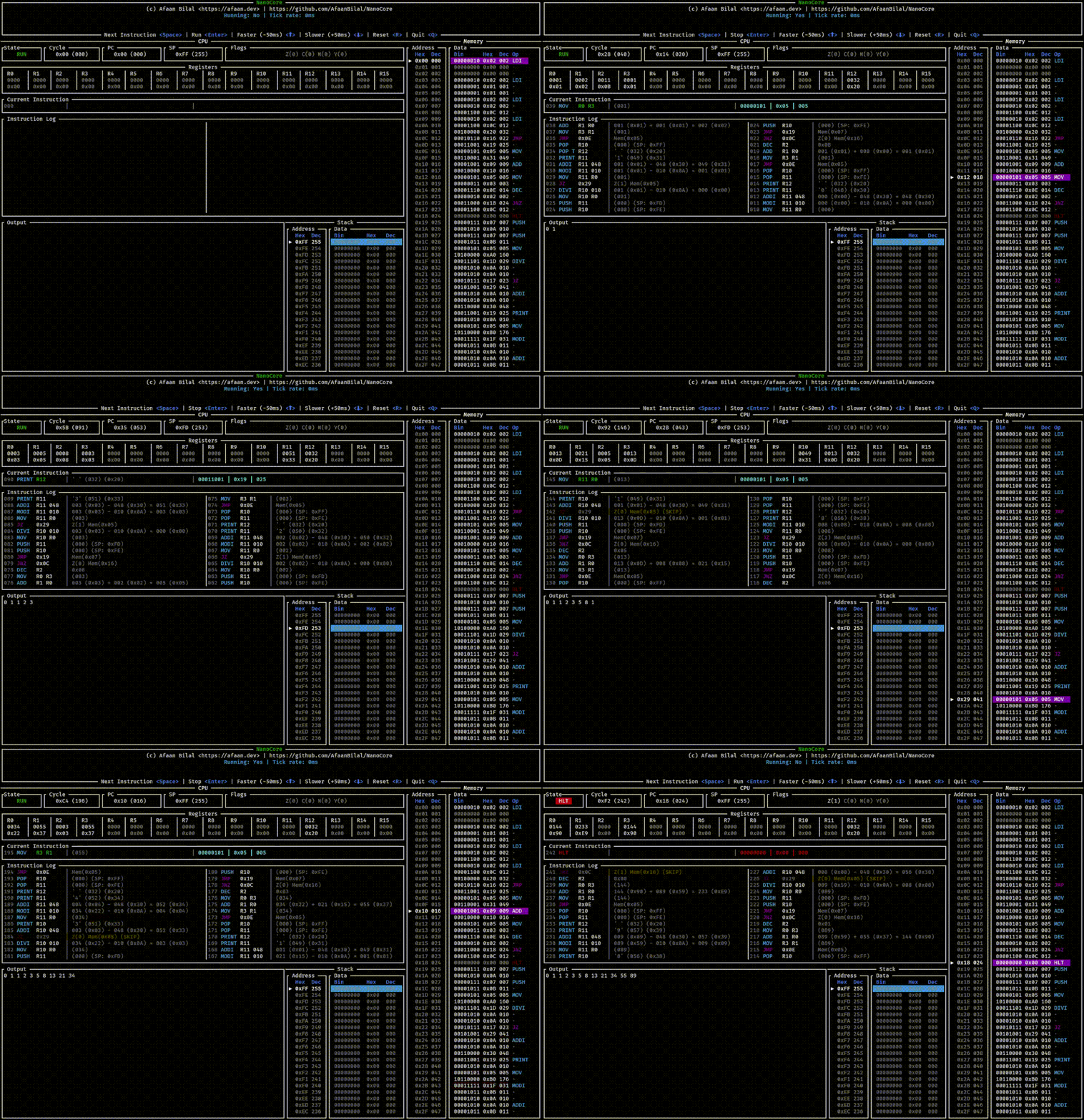
NanoCore TUI debugger
256bytes memory
16registers
45+instructions
3CLI tools

Features

CPU

True 8-bit Architecture

All registers, Program Counter, Stack Pointer, and memory addresses are strictly 8-bit. No shortcuts.

ASM

Built-in Two-pass Assembler

Write .nca assembly files with labels, constants, strings, and raw data directives. Assembles to compact binary .ncb format.

TUI

Terminal UI Debugger

Interactive debugger with register state visualization, memory view, instruction log, and breakpoint support — all in your terminal.

VAR

Variable-length Instructions

1-byte, 2-byte, and 3-byte instructions pack maximum program logic into 256 bytes of addressable space.

FDE

Fetch-Decode-Execute

Modular CPU design with distinct Fetch, Decode, and Execute phases makes the architecture transparent and educational.

ERR

Typed Error Handling

Stack overflow/underflow, division by zero, invalid operands — all represented as structured Rust error types with useful diagnostics.

Architecture

NanoCore models a simple but complete von Neumann architecture. All components live in 256 bytes.

Registers
R08-bit
R18-bit
R28-bit
R38-bit
R48-bit
R58-bit
R68-bit
R78-bit
R88-bit
R98-bit
R108-bit
R118-bit
R128-bit
R138-bit
R148-bit
R158-bit
Special Registers
PCProgram Counter0x00 – 0xFF
SPStack Pointer0xEA – 0xFF
Flags
ZZero
CCarry
NNegative
Memory Map (256 bytes)
Program / Data 0x00 – 0xE9
Stack 0xEA – 0xFF

Stack grows downward from 0xFF. 22 bytes available. Program loads at configurable start address.

Instruction Set

45+ instructions across 7 categories. Variable-length encoding (1–3 bytes).

Control Flow
MnemonicOperandsBytesDescription
HLT1Halt execution
NOP1No operation
JMPaddr2Unconditional jump to address
JMPRRx2Jump to address in register
JZaddr2Jump if Zero flag set
JNZaddr2Jump if Zero flag clear
CALLaddr2Call subroutine (push return addr)
CALLRRx2Call subroutine via register
RET1Return from subroutine
Load / Store
MnemonicOperandsBytesDescription
LDIRd, imm83Load immediate value into register
LDARd, addr3Load from memory address into register
LDRRd, Rs2Load from address in Rs into Rd
MOVRd, Rs2Copy register Rs into Rd
STOREaddr, Rs3Store register into memory address
STRRd, Rs2Store Rs at address held in Rd
Arithmetic
MnemonicOperandsBytesDescription
ADDRd, Rs2Rd = Rd + Rs
ADDIRd, imm83Rd = Rd + imm8
SUBRd, Rs2Rd = Rd − Rs
SUBIRd, imm83Rd = Rd − imm8
INCRd2Rd = Rd + 1
DECRd2Rd = Rd − 1
MULRd, Rs2Rd = Rd × Rs
MULIRd, imm83Rd = Rd × imm8
DIVRd, Rs2Rd = Rd ÷ Rs
DIVIRd, imm83Rd = Rd ÷ imm8
MODRd, Rs2Rd = Rd mod Rs
MODIRd, imm83Rd = Rd mod imm8
Logic
MnemonicOperandsBytesDescription
ANDRd, Rs2Rd = Rd & Rs
ORRd, Rs2Rd = Rd | Rs
XORRd, Rs2Rd = Rd ^ Rs
NOTRd2Rd = ~Rd
CMPRd, Rs2Set flags from Rd − Rs (no store)
Bit Shifts
MnemonicOperandsBytesDescription
SHLRd, Rs2Logical shift left
SHRRd, Rs2Logical shift right
ROLRd, Rs2Rotate left
RORRd, Rs2Rotate right
Stack
MnemonicOperandsBytesDescription
PUSHRs2Push register onto stack
POPRd2Pop top of stack into register
I/O
MnemonicOperandsBytesDescription
INRd2Read a byte from stdin into Rd
PRINTRs2Print register value as ASCII char

Assembly Language

NanoCore Assembly (.nca) is a simple, human-readable format. Write programs, assemble to binary, run or debug them.

Syntax Reference

; This is a comment ; Define a constant .CONST MAX 10 ; Embed raw bytes .DB 0x41 0x42 0x43 ; Embed an ASCII string .STRING "Hello" ; Label definition start: LDI R0 0 ; R0 = 0 LDI R1 1 ; R1 = 1 LDI R2 MAX ; R2 = 10 (constant) loop: ADD R0 R1 ; R0 += R1 DEC R2 ; R2-- JNZ loop ; repeat if R2 != 0 HLT ; done

Fibonacci Sequence

start: LDI R0 0 LDI R1 1 LDI R2 12 ; count LDI R12 32 ; space char loop: JMP print resume: MOV R3 R1 ADD R1 R0 MOV R0 R3 DEC R2 JNZ loop HLT print: PUSH R10 MOV R10 R0 DIVI R10 10 JZ unit ADDI R10 48 PRINT R10 unit: MOV R10 R0 MODI R10 10 ADDI R10 48 PRINT R10 PRINT R12 POP R10 JMP resume

Assembler Directives

.CONST name value

Define a named constant. Use the name anywhere an immediate value is expected.

.DB byte [byte ...]

Embed raw byte literals directly into the program at the current position.

.STRING "text"

Embed a null-terminated ASCII string into the program at the current position.

CLI Tools

Three binaries — emulator, assembler, and debugger.

nanocore Emulator
# Run a pre-assembled binary $ cargo run -- programs/test.ncb # Auto-assemble and run .nca source $ cargo run -- programs/fib.nca # Print CPU state after each cycle $ cargo run -- programs/test.nca -s # Print each instruction as it executes $ cargo run -- programs/test.nca -i
nca Assembler
# Assemble source to binary $ cargo run --bin nca -- \ -i programs/fib.nca \ -o programs/fib.ncb # Outputs compact .ncb binary # ready for distribution

Terminal UI Debugger

Step through instructions, inspect registers and memory live, and set breakpoints — all inside your terminal.

NanoCore TUI debugger demo
Live register state for all R0–R15, PC, SP, and flags
Full 256-byte memory view
Instruction log with cycle counter
Step, run, and breakpoint controls
Program output panel
# Launch with any .nca or .ncb file $ cargo run --bin tui -- programs/counter.nca

Get Started

Three ways to install NanoCore.

Compiled binaries
Download pre-built binaries for your platform from the GitHub releases page.
GitHub Releases →
cargo install
Install directly from crates.io. Requires Rust stable.
$ cargo install nanocore
Build from source
Clone the repository and build with Cargo.
$ git clone https://github.com/AfaanBilal/NanoCore.git $ cd NanoCore && cargo build --release
Then run
# Run an example program $ cargo run -- programs/fib.nca # Launch the TUI debugger $ cargo run --bin tui -- programs/counter.nca # Run the test suite $ cargo test
View on GitHub

Author

Afaan Bilal
Afaan Bilal

Principal Software Engineer, CISO and open-source enthusiast.

NanoCore was built as a deep dive into CPU design, instruction set architecture, and the craft of writing an emulator from scratch in Rust.